Donor reporting, without the calculator evening

Bank statement and receipts in. Verified donor report out.

Upload the month's statement pages and receipt photos. ReportFlow matches every receipt to a bank payment, rebuilds cash withdrawals, applies your fund's bookkeeping rules, checks every statement row against the running balance, and produces the donor-ready Excel only when the numbers agree with the bank.

14-day trial, no cardEvery statement row verifiedExcel blocked until it reconciles
August reportREADY TO EXPORT
Matched43 / 43
Reconciliation0.00
Notes2
Statement integrity46 / 46 rows chain correctly
PASS
Cash withdrawals3 splits reconstructed from receipts
FOUND
Interchangeable evidence4 same-value food receipts; paired automatically
INFO
Learned bookkeeping rules46 lines classified from prior work
APPLIED
Donor Excel is ready
Hard controls passed
Match the evidenceExact receipts and cash-withdrawal splits
Reuse what was learnedKnown payees follow the bookkeeping rules
Check what mattersBalance-chain integrity plus reconciliation
Stop only when necessaryImmaterial ties are notes, not roadblocks
What changes

The month you do by hand, and the month with ReportFlow.

Before
  1. Print the statement, type every line into Excel
  2. Find the receipt for each payment; work out which receipts make up each cash withdrawal
  3. Decide the donor category for every line, again
  4. Split lines that cover two purposes by hand
  5. Add up every column, check the closing balance, find the typo, repeat
  6. Lay out the report the donor expects, print, sign
After
  1. Photograph the statement pages and the receipts
  2. Look at the exceptions ReportFlow flags: a payment with no receipt, a receipt not on the statement, a category it was unsure of
  3. Generate the Excel, already in the donor's layout, already reconciled to the bank

Everything the system decided is visible and editable; what it learned from your corrections is applied next month.

What the AI decides, and what the system verifies

AI reads and suggests. Arithmetic decides.

The model is used for
  • Reading statement pages and receipt photos into rows
  • Suggesting a category when no learned rule applies
  • Tidying wording (never names or numbers)
Deterministic checks decide whether the Excel exists
  • Every statement row must satisfy: previous balance minus debit plus credit equals the printed balance
  • Receipts attach to a payment only when the amounts match exactly; nothing is forced
  • Every line's categories must add up to the line; every column total must add up to the report
  • Opening balance plus income minus expenses must equal the bank's closing balance

A misread digit cannot pass these checks, which is why the model can be trusted with the reading.

How the work is divided
Rules handle the known

Payees your fund has seen before go straight to their column.

AI handles the ambiguous

Reading photos and suggesting categories for new payees, flagged as suggestions.

Arithmetic verifies the result

Running balances, exact allocations and the closing reconciliation decide whether the Excel exists.

You handle the exceptions

A missing receipt, an unplaced one, a category it was unsure of. Not every line.

The aim is a financial reporting layer for donor-funded organisations: evidence in, verified report out, the trail kept.

One reporting run

Evidence in. Report out.

The workflow is designed around the real monthly job: reduce repetitive placement and calculator work, while preserving the controls that catch material statement or allocation errors.

01

Upload the month

Add statement pages plus receipt photos, vouchers, CSV or XLSX evidence. Files are saved under content hashes, so repeated phone filenames cannot overwrite one another.

02

Let ReportFlow assemble it

Receipts are matched to bank debits, withdrawal splits are reconstructed, and saved payee rules classify familiar transactions. AI is used only where the rules are insufficient.

03

Check the exceptions, not every line

The workspace highlights bank-only debits, unplaced receipts, model/fallback classifications and interchangeable evidence. You edit what actually needs correction.

Hard controls

The report can reconcile and still be wrong.

That is why ReportFlow keeps statement integrity separate from closing arithmetic. A corrupted intermediate balance is a blocker even when the final printed closing number still matches.

01

Running-balance chain

Every statement row is checked against the previous balance. A chain break stops Excel generation.

02

Page and account continuity

Missing page continuity, mixed account numbers, mixed periods or a missing opening row are treated as material statement failures.

03

Exact allocations

Every report line must allocate exactly to its amount. A broken split cannot quietly disappear into the final workbook.

04

Closing reconciliation

Opening balance + income − expenses must equal the bank closing balance before the Excel can be generated.

THE WORKSPACE

Every number checked, every exception visible.

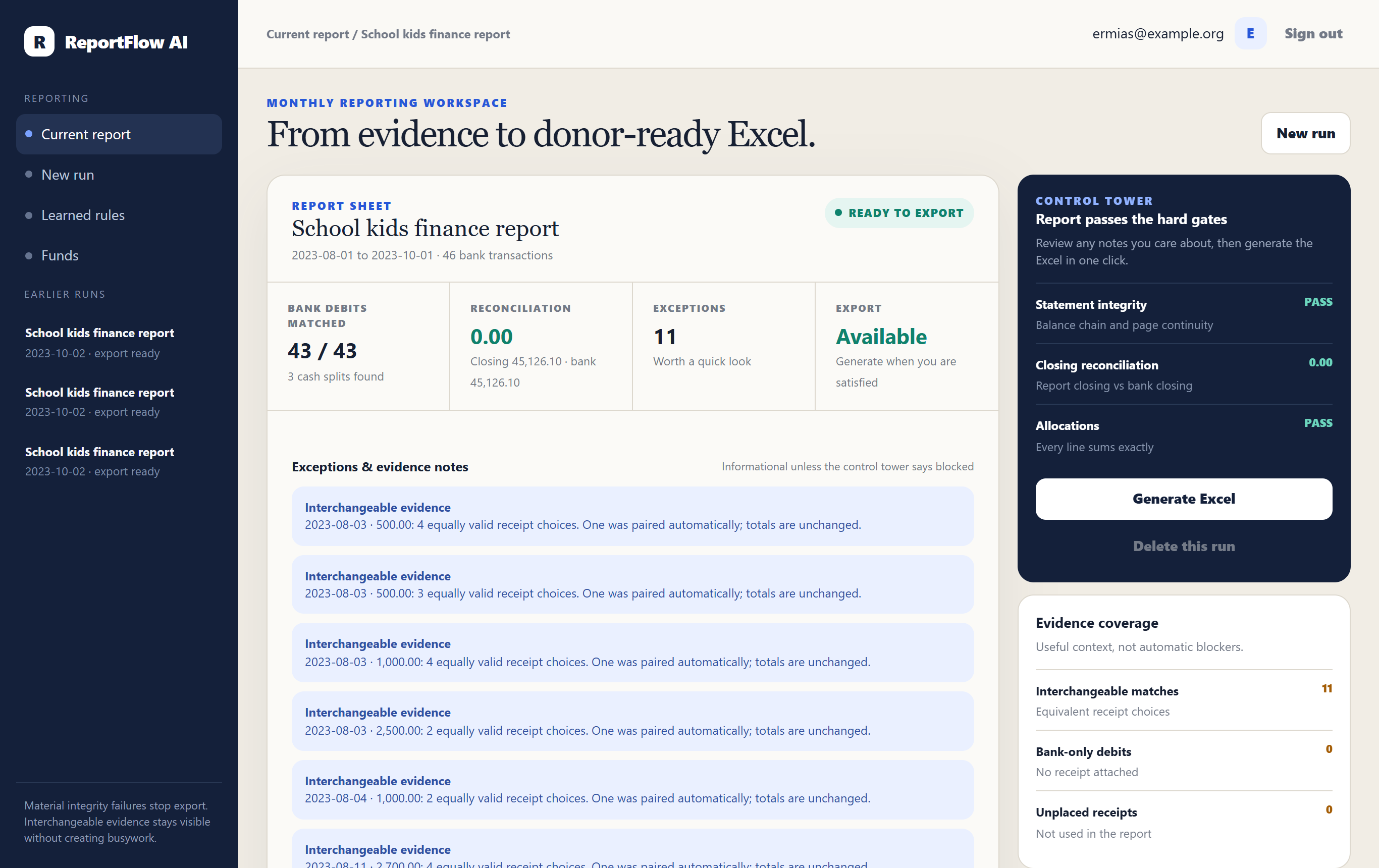
The control tower shows whether the statement chains, whether the report reconciles and whether every line allocates exactly. Notes stay informational; only material failures stop the Excel.

Download a sample report (Excel, anonymised real data)

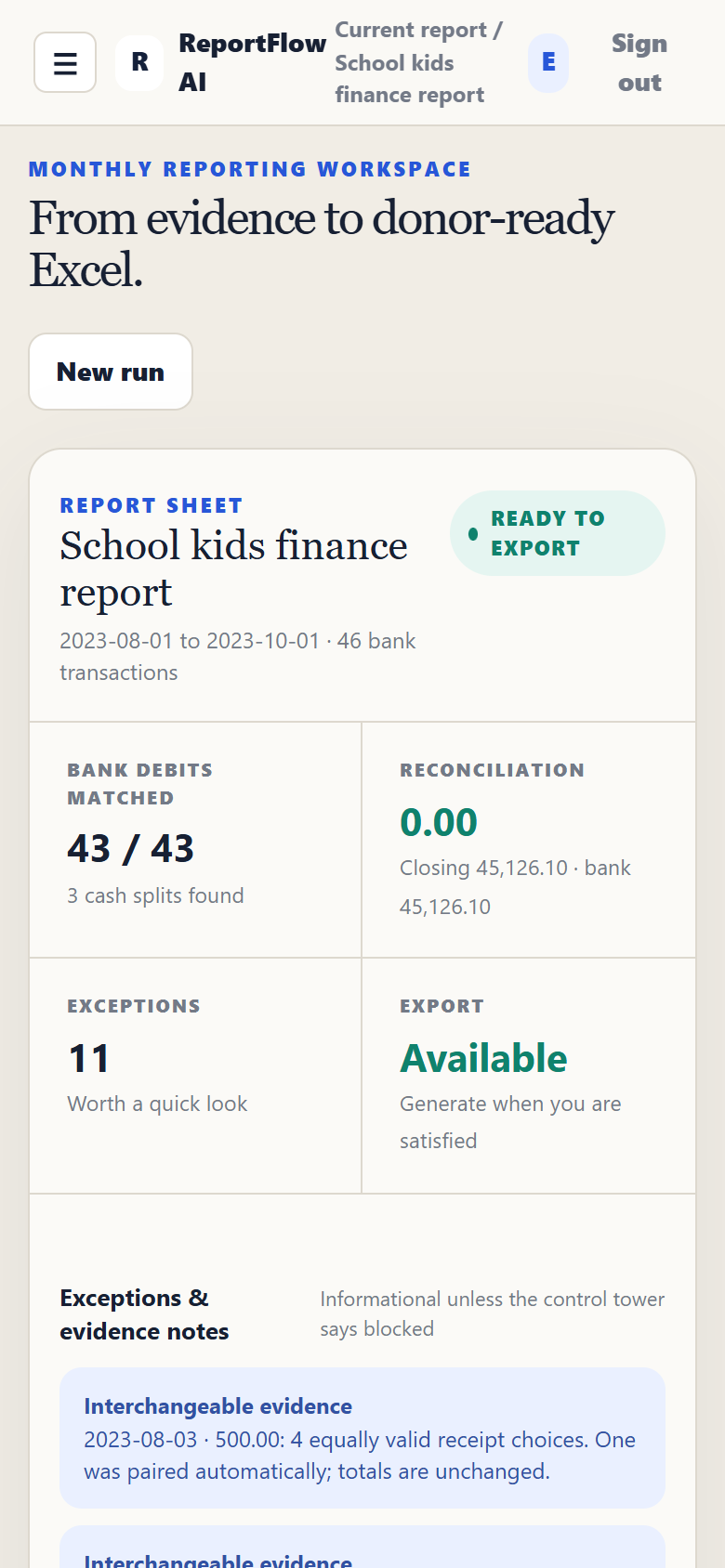
ReportFlow AI workspace on a laptop: 43 of 43 bank debits matched, reconciliation 0.00, export availableThe same workspace on a phone
PRICING

One plan per organisation. Invite your whole team.

Every plan starts with a free 14-day trial, no card needed. No per-seat charges within your plan’s member allowance. Correcting and re-downloading a report never counts twice.

Starter
$39/month
2 funds · 3 members · 10 reports a month
One small organisation, a couple of funds.
Standard · most common
$99/month
10 funds · 10 members · 50 reports a month
Several programmes and a small finance team.
Pro
$199/month
Unlimited funds and members · 250 reports a month
Larger finance teams and many funds.
Every plan includes
  • Statement reading with running-balance verification of every row
  • Receipt reading (photos, CSV or Excel), matching to bank payments, cash-withdrawal splits
  • Learned categorisation rules per fund, editable by your team
  • The donor-format Excel report with totals, summary, signature lines and a self-checking difference line
  • Team access is included within your plan’s member allowance; sign-in uses an emailed code; learned-rule snapshots stay inside your organisation workspace
  • Uploaded files deleted after analysis; runs kept 60 days or until you delete them
Is it worth it for your team? Use your own numbers.

We do not publish time-saving claims; fill in what a report costs you today and compare.

What counts as a report: one generated Excel for one fund and one statement period (for example, one fund's August and September report). Re-checking, correcting and re-downloading that same report does not count again. Runs that are blocked by a failed check do not count.

Prices in US dollars per organisation per month; VAT where applicable is added at checkout. Payments are processed by Paddle. Cancel any time; access continues to the end of the period.

Designed for real bookkeeping

Conservative where it matters. Practical where it doesn’t.

Four identical receipts for the same amount against four identical bank lines are not four accounting emergencies. ReportFlow records the interchangeability and proceeds because the report totals and donor categories are unchanged.

Over-cautious automation

  • Stops on every plausible receipt tie
  • Requires confirmation clicks on routine learned rules
  • Turns automation into another review checklist
  • Optimizes for theoretical certainty over actual work

ReportFlow’s hybrid model

  • Uses deterministic best matches and records equivalent alternatives
  • Lets learned rules handle routine transactions automatically
  • Surfaces exceptions without making every note a blocker
  • Reserves hard stops for material financial integrity failures

Finish the month without rebuilding it by hand.

Open the private reporting workspace, upload the evidence, and let the controls tell you whether the report is ready.

Start your free trial